Are you looking for a free, easy, step by step guide on how to set up a blog for free? I can help.
But…how on earth do you get started? There’s so much info out there on the internet, and everyone’s telling you to do different things. Who do you listen to? Where’s the best starting point?

But did you know that starting your own blog may be easier than you think?
Creating a blog can be overwhelming and intimidating if you’ve never done it before. With over 1.9 Billion websites out there and when you think of a “free” website, do you visualise a basic cheap site that would hardly get any traffic? Like a signpost in the desert?
In fact, some people have successfully run free blogs without spending a dollar. You can too and become successful. An important issue that puts a lot of people off from running a free blog is ranking. Most people believe that it’s easier for a self hosted blog to rank in search engines than a free blog.
In this post, I’m going to show you how to set up a blog for free. I’m going to give you the run-through on free versus self-hosted websites and which will give you the best rankings in search engines. I’ll even touch on the fun part…how to start a blog for free and make money.
Why You Should Create a Blog and Join the Blogging World
One of the misconceptions about starting a blog is that you need to be a great writer to be successful. Nothing could be further from the truth. People read blog sites to get a personal perspective on things, so most bloggers write in a very informal and conversational style.
In addition, you don’t need to be an expert on your topic in order to have a successful blog. For example, readers of a fitness or weight loss blog don’t want to read a textbook from a scientist, they want to hear the experiences of someone who has actually got fitter, lost weight, had some setbacks, mistakes and all.
To be successful as a blogger there is really just one requirement: a passion for your topic.
At its heart, blogging is about sharing your knowledge with the world. Choosing a topic that you are passionate about makes the process of starting a successful blog so much easier. Writing about more than one topic is totally fine too. As long as you are writing about things that you are genuinely interested in, your passion will shine through and keep your readers interested.
So why would you go to the trouble of blogging? There are a few reasons:
So below, I’m going to outline exactly what you need to do to get started and set up your own personal blog. Before we dive in though, I really want to talk about WHY you should build a blog.
Note: If you already have a solid idea of the whys, then skip this and go right ahead with the guide.
- Share your story. A blog allows you to have a voice and be heard. You can share your story with the entire world if you so choose. Blogging has quickly become one of the most popular ways of communicating and spreading information and news. There are literally millions of blogs online (don’t worry, you can make yours stand out and get noticed!).
- Get recognition for yourself or your business. A successful blog can gain you loads of recognition in your respective field. Many bloggers are known as experts just because of their blogs. Also It’s a great way to express yourself and also a fantastic way to share information with others.
- Community and interaction. Blogging at its heart is interactive. You write a blog post and people comment on it. This is a great way to connect with people who are interested in the same things as you are. Blogging allows you to teach these people based on your experience, and it gives you the opportunity to learn from your readers as well. Through writing, comments and interaction, you become a better person and a better writer.
- The best reason? You can make money doing it! Blogging can be very lucrative if done correctly. The top bloggers in the world obviously earn a lot of money, but even a part-time blogger can expect to make a regular income if things are done correctly. The best part about it is that blogging is a form of passive income, since you can spend just a few hours a week writing a blog post and then continue to make money from it long after the blog post is written. I go into much more detail on how to blog for money later in this guide.
The good news is that the internet is exploding with growth right now. More people than ever are online, over 4 billion!. This explosion in growth means more potential readers for your blog. In short, if you are thinking about starting a blog then there is no better time than right now.
One very last thing before we get started:
Creating your own blog can take a little while, probably up to 30 minutes. So grab yourself a coffee, tea or drink (whatever you fancy) and let’s get right into it. If you need any help during the set-up process, get in touch with in comments below and I’ll help as best I can and answer any questions you might have).
The Steps Covered In This Blogging Guide
It’s nowhere near as difficult as setting up a website from scratch (there’s very little technical ability needed here). In fact, there’s no coding required by you. Good news, hey?
How to Set Up a Blog for Free – How to Start a Blog in 7 Steps:
There’s five main steps you need to do in order to start a blog. If you follow this guide exactly, you’ll have your own blog set up in 30 minutes or less.
- Choose a great blog platform.
- Choose a web host for your blog
- How to Set up a blog on your own domain
- Design your new blog
- Write & publish your first post. Woo hoo!
- Promote your blog – Bonus tips for extra success to get more people to read your blog
- Make money blogging. Choose from various options to monetize your blog.
- Bonus useful resources for blogging
Let’s start your blog! So, without further ado, let’s jump into step 1.
Step 1 – Choose Your Preferred Blogging Platform
Choosing where you want to build blog is pretty much the first thing you have to do. I’m going to take a leap and assume you’ve heard of WordPress, and this is the platform I advocate. It’s massive.
Hands down, I recommend using WordPress because it is the most user-friendly and robust platform. Also, Google loves WordPress because they are a great choice for SEO. From all accounts, Google ranks WordPress sites faster than those of other blogging platforms. It’s by far one of the biggest blogging platforms in the world, with countless plugins and add-ons and almost infinite ways to design and customize the layout of your blog.
WordPress is the most popular Content Management System (CMS) in the world and is used by nearly 75 million websites.
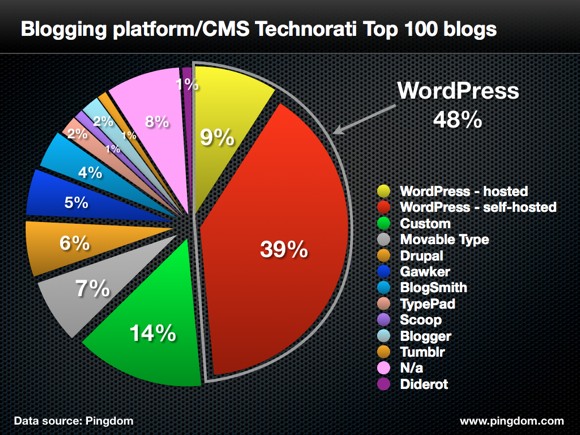
There are other alternatives free blog makers however, and they are listed below:
Blogger – Definitely the next best thing to WordPress.
Tumblr – Half social network, half blog. Interesting, and very simple to use.
The future success of any blog depends on the blogging platform chosen. For example, its very rare to become successful with a free blog on Blogger.com as the blogs on a free blog maker don’t last for a long time before they get deleted from the Blogger web world.
Even though WordPress is bigger (and probably better) than those two, here are my top reasons why you should still go with WordPress:
- Better rankings on search engines
- Easiest to use. Super easy set-up and is free to use
- Customizable. Tons of free themes and layouts (I’m not kidding, there’s thousands!).
- Massive support forum in case you get stuck (you won’t, but it’s nice to have it there if you need it).
- Your blog will be faster and it’ll also look better, with great functionality and form
- People can interact with you easily. Your content can be shared, commented on, and so on.
So with WordPress the clear winner, for the rest of this article, I’ll focus on how to start a blog by using WordPress.
Step 2 – Get Your Blog Online – Self-Hosting or a Free Site?
Take a drink and time to consider here! This is the biggest decision you’ll have to make before we go any further. You need to decide whether to pay for your blog or grab a free one.
WordPress, Tumblr and Blogger all offer free blogs for anyone. Awesome, right? It’s perfect for those of us who aren’t super serious about blogging. But it does have downsides:
1) You won’t be able to get your OWN domain name
On a free blog, your blog’s web address (your URL) will be plain….ugly. In short, create a free blog with any other the above free blog services and it’ll look like this:
myblog.wordpress.com
myblog.blogspot.com
myblog.tumblr.com
I know, ugly right?
2) LIMITS, limits and more limits
There are some limits to free blogs. Earning limitations – you can’t fully monetize it. Also you don’t have the possibility to upload all those videos and images you want to show everyone – it’s all limited. Worse still, you won’t even have access to the free themes offered by WordPress.
You can’t modify the themes and you cannot upload plugins, so you’re missing out on the real power of WorPress which comes from the freedom to customize and extend the core functionality.
3) You DON’T OWN your blog
It might sound silly at first, but you don’t actually own your blog. It’s hosted on someone else’s web property and they can delete it if they want so. They have done so in the past, and keep doing it in the future. Which means all your hard work on your blog, all those countless hours of writing blog posts might be vanished within seconds. Brutally sad…
On the other hand, with a self-hosted blog on your own domain name – you are the REAL owner of your blog. You’ll be able to name your blog whatever you want, for example “YourName.com” or “YourAwesomeHobby.com. You can end it with .com, .net, .org, or virtually any other web suffix. Add to that unlimited bandwidth for videos, images and content plus the free themes and you have a winning combo.
So how much is hosting and a domain name? Not as much as you’re thinking, fortunately. It usually works out to about $4 to $10 per month, depending on your hosting provider which is less than a few cups of coffee.
Step 3 – Start a Blog on Your Own Domain (if you chose self-hosting and a custom domain)

I’m going to push ahead based on the premise you’ve chosen WordPress and self-hosting, and if you haven’t, you should. Seriously, it’s the best. This is what I will illustrate for the rest of this article, similar steps to below apply to the free blog makers.If you’re still a little confused by what a self-hosted blog is, allow me to explain and how you can go about setting one up for yourself.
You’ll need to come up with a domain name you like and also choose a hosting company that can host your blog.
- Domain: The domain is basically name your website calls its home. It’s the URL of your website. Examples: google.com (Google.com is the domain), Facebook.com (Facebook.com is the domain). See? Simple!
- Hosting: Hosting is basically the company that puts your website up on the internet so everyone else can see it. It’s the place that stores your website and ensures it serves efficiently and quickly to people visiting your site.
Personally, I have used two good hosting providers. Firstly SiteGround (for my blog domain and hosting), and I’ve had a good experience with their hosting. The main reasons for initially choosing SiteGround were:
- Easy to get started with
- They are fast – offer faster servers
- Safe and secure – offer daily backups, malware scans and DDoS protection for free
- Support is better – simply outstanding, the best and fastest you’ll find at any web hosting company
SiteGround and Bluehost are two of the best known hosting companies in the world right now, here’s a more detailed comparison.
For all of this it’s very reasonably priced at $4.95 per month for the initial discount period. A domain name will cost around $15.95 a year, so this is not free, but very cheap. For the price of a few cups of coffee a month, you get so many benefits and fully control your own website asset.
On renewal however, the decent SiteGround GrowBig plan was a big jump to $24.99/month. I already have websites hosted at Wealthy Affiliate. Premium members can host 10 websites for no extra cost, so it was an easy decision to move the hosting there.
So I recently cancelled my Siteground GrowBig hosting, which has comparable quality hosting. This was going to add up to US$312 a year given my initial hosting honeymoon term expired. Note that Bluehost Choice Plus has even lesser features and is not as fast as Wealthy Affiliate or Siteground (and the support is not as good). This would cost US$156 a year before upsells like SiteLock security for malware protection at $96 to $504 per year. Can you see how much money you can save with Wealthy Affiliate just for the hosting alone?
If for any reason you don’t want to go with SiteGround or Wealthy Affiliate, feel free to choose your own hosting company. Most, if not all of them, should have a “one-click” WordPress install solution on their admin panel.
That button will automatically install WordPress on your blog. Did I say it was simple or what?
All you need to do is either:
- sign up with SiteGround, choose your hosting plan and a domain name and look for the one-click WordPress install button on the admin panel.
- Create your own Wealthy Affiliate free starter account for hosting and you’ll also get training, a helpful community, and me as a personal one-on-one support coach and mentor. You can see how easy this is to setup in this post.
- or your chosen hosting provider
WordPress essentials aren’t often needed, but I’d recommend whois privacy (that will keep all your personal details private) and definitely automated backups (this’ll save your website just in case anything fails or disappears, so you won’t lose any or very little of your blog).
Once WordPress is installed on your website, all you have to do to start blogging is go to your WP-Admin page usually www.yourblognamehere.com/wp-admin and start writing by adding a new post.
At the start, the layout looks confusing, but it gets very understandable quickly. Don’t worry!
Step 4 – Designing Your WordPress Blog
Now, the really fun part.
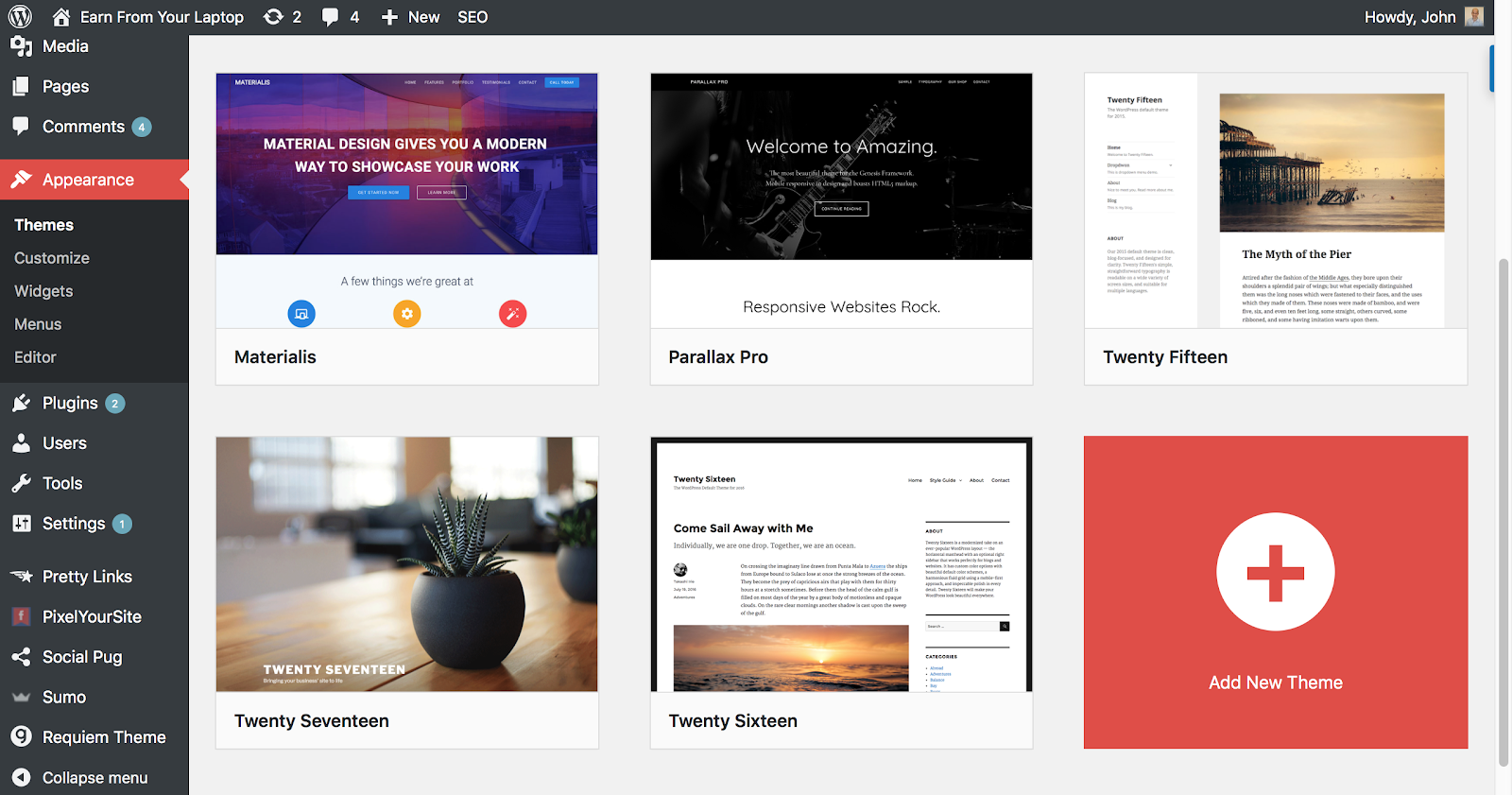
Let’s make your blog look exactly how you want it to. To choose a new theme, you can either head to Appearance > Themes and install a free WordPress theme or you can head to a premium theme website like ThemeForest.net and buy a theme for around $40.
Also GeneratePress is a lightweight fast theme (and Google loves fast websites for user experience), they have free but the real benefits come from their Pro plan which has loads of beautiful templates and are reasonably priced at less than $50 for a super fast website.
I usually choose something that looks professional and pretty easy to customise. WordPress also has this awesome feature that allows you to change themes with just a few clicks. So if you start getting tired of your current blog template, you can just switch to another one without losing any precious content or images.
Remember, your blog’s design should reflect both you and your personality, but also what the blog is about. There’s no point having a foodie-orientated theme if your blog is about fitness and weight loss, understand?
On top of that, it should be easy to navigate if you want people to stick around. If it’s tricky and difficult to move around it, people won’t stay. Design is a subjective art; meaning everyone likes different things.
But no one likes ugly websites, and they especially hate websites that need a university degree to navigate. Make it easy for them.
If you don’t like any of the themes that are already installed you can easily choose from the thousands of other free themes. To install a new theme, simply click on the “Appearance” tab and “Add New” button at the top or the icon shown above.
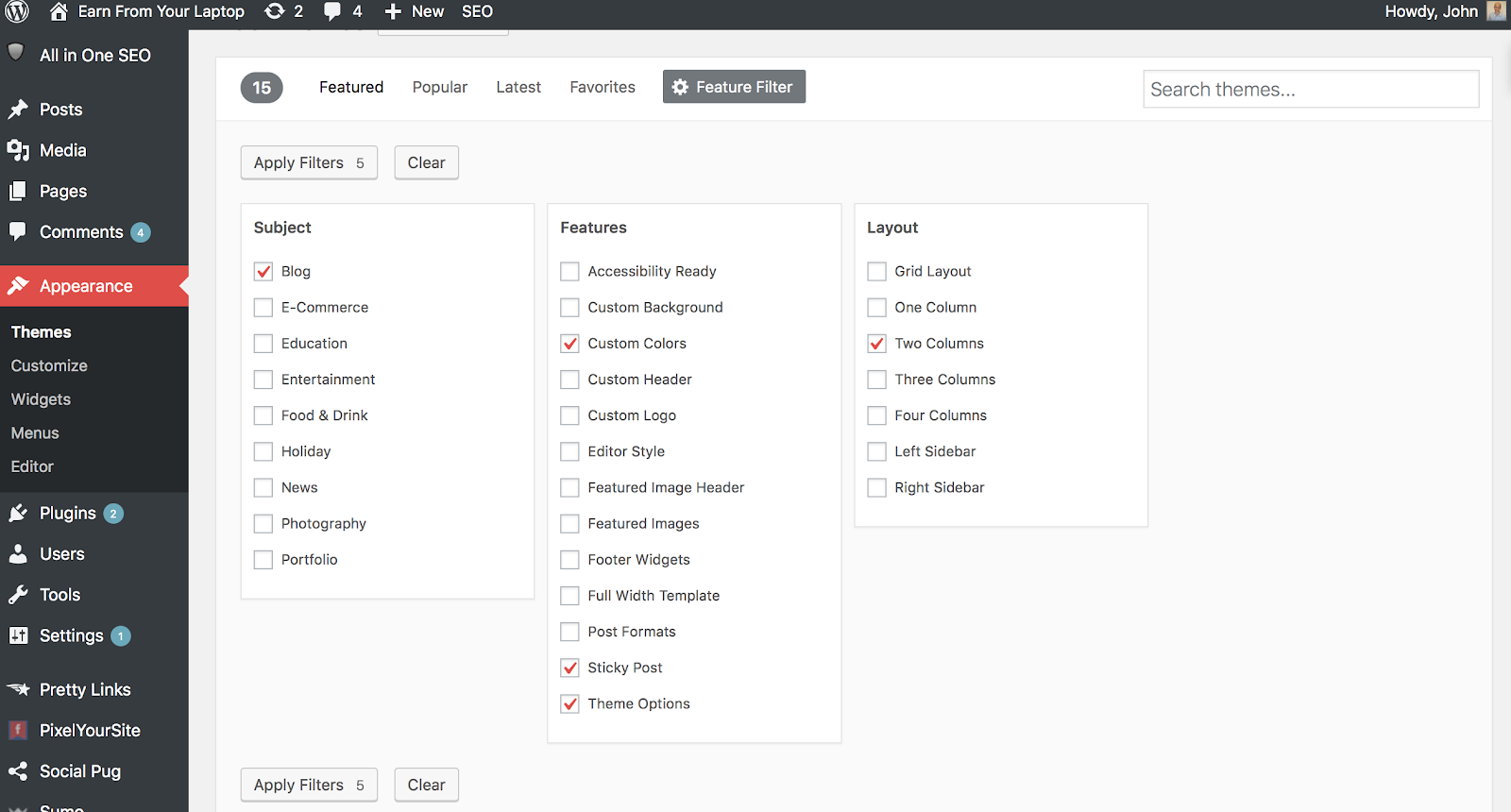
This is the theme search screen. By clicking the “Feature Filter” you can seach by type/subject, all the features you want, layout and more. Check all the boxes that you want and then click “Apply Filters”. This will help you narrow down amongst the thousands so you can hone in on what will meet your needs best.
Now you can browse a more focused list of themes that have the characteristics that you’re looking for. It’s good to preview them then click the “install” button when you hover over the one you like best.
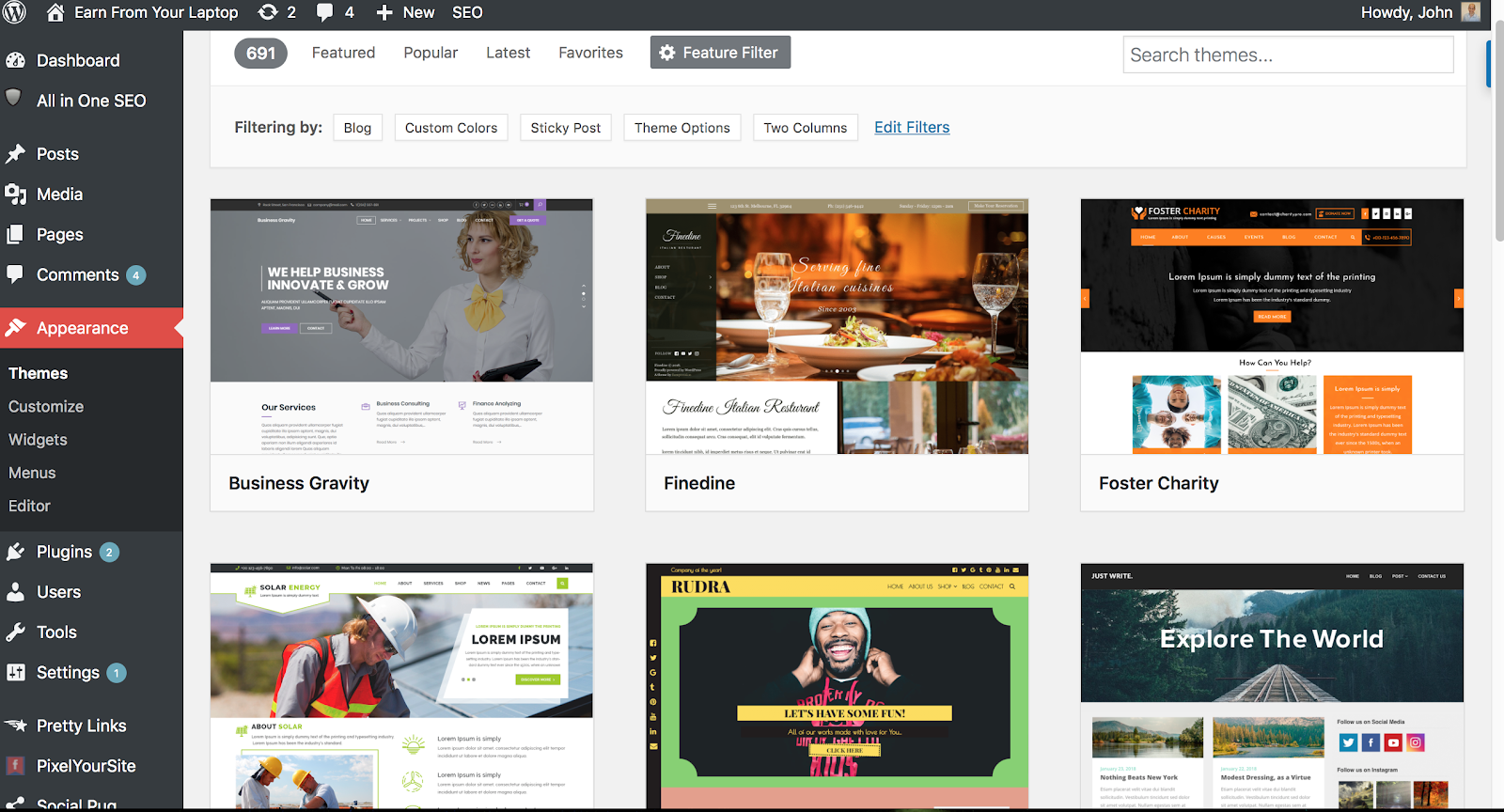
Once the theme is installed, click “Activate” to make the theme live on your blog. To see your new theme in action, simply go to your blog and have a look.
Changing your theme is the simplest way to customize your blog, there are lots of other customizations you can do but let’s keep it simple for now.
Next step! Woo Hoo!
Step 5 – How to Write a Blog Post and Publish it
Exciting times! Now that your blog is up and running it’s time to actually do some blogging!
On the left menu and click on “Posts”. You’ll see there is already a default post there – this is on every new WordPress blog. We don’t need this post. To delete it click “Trash” just below the post.
To begin writing a new post, click the “Add New”.

If you would like to add a picture to your post, click on the “Add Media” button and click “Select Files” to upload a picture from your computer. You can make adjustments to the picture size on the next screen. When you are ready click “Insert into post” to add the picture.

Once you have finished your post just click the “Publish” button on the right side of the screen to publish it.
You’ll then start diligently building your new blog with informative and helpful content that engages and helps visitors. If you’re regularly publishing posts on your blog, you’ll constantly receive the attention of the search engine spiders to your site and this will eventually lead to ranking. If you provide consistent, quality content, you’ll improve your search engine rankings with time and traffic will flow to your blog before you know it.
Step 6 – Promote Your Blog – Bonus tips for extra success to get more people to read your blog
Creating a well-designed blog and writing great content is just the start. In order to get readers for your blog you will need spend some time promoting it, especially when you first start.
Activate Social Media Icons on Your Blog
You must add social share buttons on your blog to appear on every blog post and page published on your website. This makes all of your content reach out to the ideal audience and to rank with respect to the social media ranking signals of search engines. Each time you publish a new post or page on your blog, you’ll share immediately using those buttons.
On the list of Google’s top 200 ranking factors, social media account engagement/traffic is vital. So you really can improve your rankings by activating these buttons on your blog and sharing your awesome content.
Let me explain further. One of my favorite ways to get readers to my blog is to post links on my social media accounts like Facebook and Twitter. This is great, because not only do your friends see the link, but if your friends share the link with their friends it automatically multiplies your readers. If you have created high-quality content on your blog then social media is a great way for your blog to go viral.
Engage Your Visitors Through Comments
Comments are the most crucial instruments when it comes to ranking in search engines. Why? Visitor engagement! Pages with lots of comments are a signal of user-interaction and quality. So ensure you get back to comments in less than 24 hours. Google and search engines count more on visitor engagement than any other activity you may be performing on your blog.
Email marketing
In addition to getting new readers to your blog, you will also want to make sure your current readers are coming back. This is where email marketing plays a big role. By collecting the email addresses of your visitors (with their permission of course), you can then notify them when you post something new on your blog. This keeps people coming back to your blog, which not only gives you more readers over time, it also allows you to build a closer relationship with your readers. This builds your customer base, increases conversions and you get repeated sales.
If you want to do this, you’ll need an email list provider and I recommend checking AWeber. It’s simple to use, has a free trial and offers excellent service.
Step 7: Make Money Blogging
Once you have put in the effort of creating great blog content and promoting your blog, making money from your blog is actually the easy part.
There are several ways you can make money blogging, from selling your own products or services, to affiliate marketing, to getting paid to write reviews of products on your blog. For most people who don’t have a lot of money, affiliate marketing is an easy addition to your blog and great way to go. It’s a proven model and also one of the best ways for you to earn a full-time income online from home. It doesn’t require a huge upfront cost, inventory, storefront or any selling in person. And with the right mindset and training, being your own boss can be your reality.
Another easy way to make money from your blog is to sell advertising space. Once you have a popular blog, advertisers will be hounding you for the opportunity to advertise. The best way to take advantage of this situation is to use Google Adsense. They find the advertisers for you and all you have to do is place the Google Adsense code on your blog to start running ads. Google Adsense takes all of the hard work out of the process and just cuts you a check.
Bonus Step 8 – Useful Resources For Beginner Bloggers
Bloggers come to blogging arena with varying degrees of online and social media experience, but we’ve all made more than a few newbie mistakes – there’s always room for more learning and improvement, whether you’re a beginner or you’ve been blogging for years.
These articles may help you climb faster on the learning curve when it comes to your first blog – enjoy!:
How to create a free website for Affiliate Marketing
Choosing a Profitable Blogging Niche
How can I work at home and make money, including the entrepreneurial mindset
How to increase traffic on your website free
7 Secrets on How to Use Google Trends to Find Keywords and Boost Your Traffic
How to Find the Best Keywords for SEO to Rank on Google
And that’s it! I’m more than confident that your initial blog set up should now be finished and ready to go, and all that should have been really pretty easy (unlike my first time, lucky you!).
If by some unfortunate circumstance you get stuck or have any questions for me about how to create a blog, just get in touch with me or leave a comment below. I’ll help you out with any problems.
If you follow the preceding steps, you’ll now know how to set up a blog and with ease and how to write a blog. Remember, the key to your blogging success is to consistently market your blog and post newsworthy, thought-provoking articles on a regular basis.
Enjoy your new blog!
My advice is to invest your precious time into building your own real online business to give you income you can rely on longer term.

Feedback
Do you have any questions for me? Do you have a better understanding of how to set up a blog for free? Will you go for a free blog maker as your blogging platform or can you see the value in owning you own domain and controlling your own blog with professional self-hosting?
Do you need more help in everything to do with blogging? You can create your free starter account and take the training for a test drive. You’ll have me as your personal support coach and I look very forward to helping you in every way I can to start your journey to being an online entrepreneur.
Feel free to share! If you have any questions regarding how to create a blog for free and make money, please leave a comment below and I will do my best to help you out. I look forward to hearing any questions, what you have to say and I always respond.